Building a Simple CAD Templates Manager
For my current job, we (myself and all the other engineers in my department) have a set of template CAD assemblies that we copy out and adjust/build upon daily, to suit contract-specific customer requirements. Some of these template assemblies are simple (few components, one drawing) while others are more complex (sub-assemblies with many components, multiple fabrication and assembly drawings). My goal with this project was to create a program that all members of the team could use to automatically:
- Copy over the template files to the correct working directory,
- rename these files in accordance with our company IPN naming conventions,
- re-reference all parts, assemblies, and drawings with each other within the working folder,
- automatically populate necessary customer and project information into the drawing title blocks.
For a more complex arrangement, automating these particular tasks can easily save half an hour of work.
Note that this is workflow is for Autodesk Inventor, and we don't yet have Vault installed to manage some of these tasks (well, didn't have Vault, this project was completed back in June 2025).
The templates themselves are all read from a shared Excel sheet which, in essence, looks like the following:
| From | To | Action (drop down) |
|---|---|---|
| SomeSourcePath/MyPart1.ipt | SomeDestinationPath/MyPart1-[contract].ipt | |
| SomeSourcePath/MyPart2.ipt | SomeDestinationPath/MyPart2-[contract].ipt | |
| SomeSourcePath/MyAssembly.iam | SomeDestinationPath/MyAssembly-[contract].iam | Reference Files |
| SomeSourcePath/MyDrawing.idw | SomeDestinationPath/MyDrawing-[contract].idw | Reference Files and Populate Border |
The from and to columns simply list the source and destination file paths of the parts, drawings, and assemblies to be copied. The third column, action, allows for an additional action to take place for that particular file. This makes templates super easy to create or edit by anyone on the team - we all have access to this sheet. To allow for correct IPN file renaming, the file paths can contain various tokens - specific terms surrounded by square brackets which will be replaced by a corresponding value when the automation is run. In the example above, [contract] would be replaced with some piece of project-specific information in the destination file name.
I wrote the actual automation application using C# WPF, making use of the Inventor API.
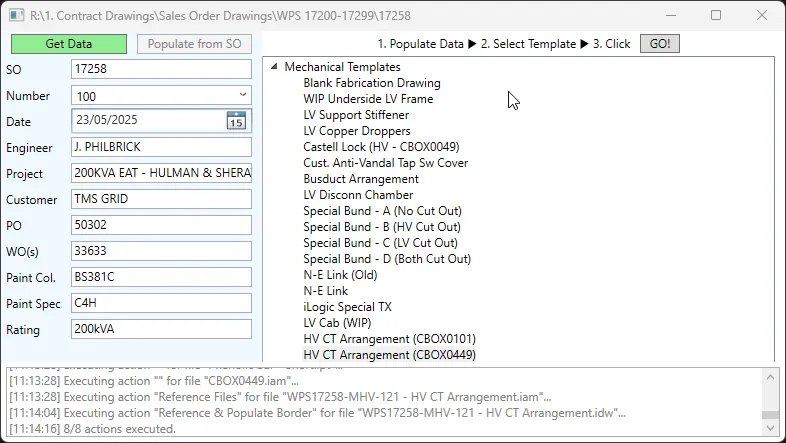
The data on the left is sourced from a variety of SQL databases, and hand-adjusted as necessary. The list of templates is automatically populated from the shared Excel sheet.
While this system works for now, it'll need to be revised if there are any updates to file naming or IPN conventions. This was a temporary solution to increase departmental efficiency prior to our department getting it's hands on Vault, which may render its use void. That being said, it gets used every day by and I'd estimate it saves ±2 hrs per week (total, over 4 engineers). At a median hourly labour rate of , that's equivalent to . While it's hard to know the exact (likely overestimated) quantitative pecuniary impact, this new tool is great fun to use and takes a lot of the boring admin-style work out of our daily workloads. I think it's also worth mentioning that this project has other benefits over time saving. It forces everyone to use the same standardised templates, wherein periodic improvements, additions, and adjustments can be instantly seen and used by all users. Furthermore, being able to create a new template an quickly roll it out to the rest of the team encourages more template creation (at least for me) which improve departmental efficiency over time.
All in all, this was a fun project and it's super satisfying to see the tool that I made be used by others on a daily basis.