A Love Letter to Typst
I don't know why, but I'm a sucker for good layout and styling when it comes to documents. I'm one of those guys who starts uncontrollably frothing at the mouth whenever I come across a Word document that inexplicably changes font, or that uses normal text for headings instead of... headings. I'm also all in for using established symbols and iconography in place of shorthand text-based counterparts. E.g. № instead of No, × instead of * or x, etc.
In WYSIWYG1 document editors such as Word, these sorts of sins2 are easy to commit. When font style or size changes, it can be hard to rectify. And when you're trying to add the proper multiplication symbol, you'll find yourself digging through endless menus and wasting a whole bunch of time. And if you want to do something specific or programmatic that doesn't have a menu? Forget about it. Not to mention consistency and templating of hundreds or thousands of documents.
Some spheres/professions need to create a whole lot of documentation, and are sensitive to these sorts of issues. The two main examples off the top of my head are academia and publishing.
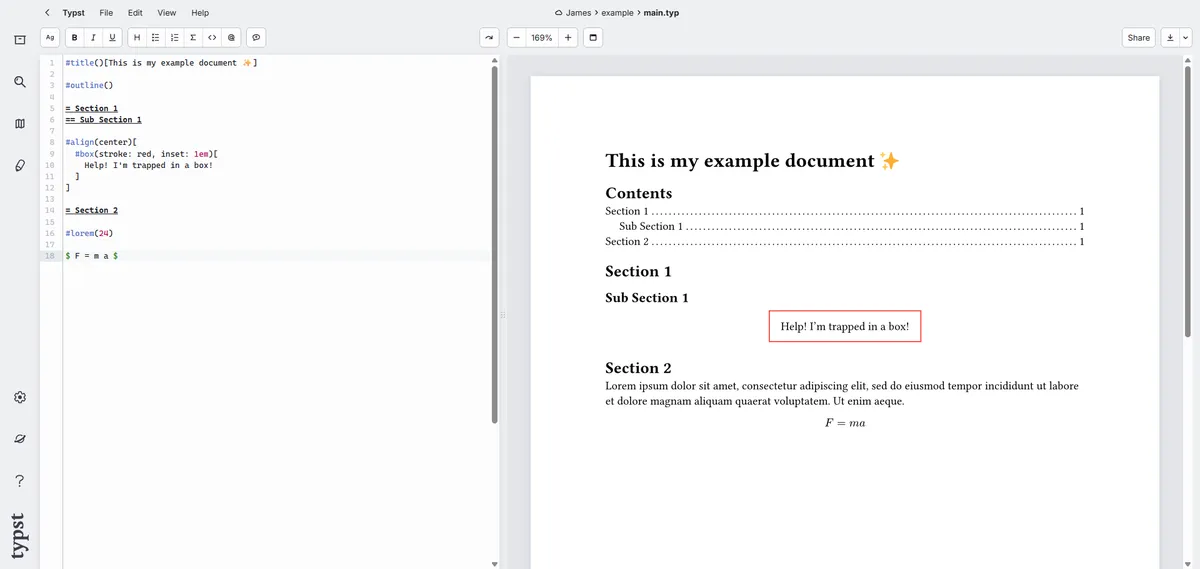
Enter stage left: the world of YAFIYGI3 editors. These feel like a mixture of markdown and scripting. The document isn't written in front of your eyes, rather it's compiled from the raw content and rules you feed the editor.
The most prolific and used software for this is Latex (pronounced "latek" for some reason), which has been floating around since the mid 80s. You may very well be familiar with it. This blog even natively supports it for authoring equations, as do many other tools such as Obsidian. But as an impudent 25 year old, I'm obliged to turn my nose up at this grandaddy software of yesteryear with all it's weird squiggly brackets and arcane error messages in favour of the new kid on the block: Typst.
Typst tackles the same problem that Latex does, just better. It's more programmatically versatile while offering simpler text formatting. It's quicker to compile (you're seeing output real-time) and it's more intuitive to use.
One nice thing it brings to the table is the equation syntax. Instead of writing \text{answer} = \frac{1}{2}, I can just type "answer" = 1/2 to get the same result:
Symbols are also great; they're organised by type. #sym.dash.em is easier to find and remember than \textemdash. Simply typing out #sym.dash. lists all the dash options available to me to pick and choose.
Templating is a lot easier too with the #set and #show commands. And being able to define variables on the fly and throw them into familiar constructs like for loops if/else conditionals is really powerful. It allows you to do things that otherwise you'd likely be looking for a package for in the Latex world.
Shapes and boxes are super easy, units of measure can be mixed and matched, the community's great, and the documentation is fantastic - you know the documentation's good when you're referring to it more than to Stack Overflow!
I could go on and on waxing lyrical about it but my ultimate takeaway is that it's fun to use and that you don't feel constrained in what you can create. So give it a go! If it's not for you, that's fine. But if you're anything like me, you'll start to feel like you've regressed to the stone age every time you're confronted with the MS Word loading dialog.